

Prepared for

IVC — Interactive Video Calling
1–3 months· 35% wait time reduction · 95% agent adoption · Throughput yield improved from 47%
It started with a number nobody wanted to see
November 2025. Max Life launches Interactive Video Calling — a mandatory IRDAI-regulated step every customer must complete before their policy is issued. A live video call between the customer and a Max Life representative. Sounds straightforward.
Within weeks the data arrived. 41% of calls were dropping. Not completing. Dropping.
That meant nearly half of every verification attempt was failing — customers disconnecting mid-call, confused by the interface, unable to flip a camera or submit an OTP without help. The throughput yield — the percentage of calls that actually completed — sat at 47%. More than half of every IVC attempt was a failure.
Regional language customers were waiting 1 minute 45 seconds just to connect. Elderly users were the worst affected — the moment they had to flip their phone camera themselves was the moment most of them gave up.
The business had a compliance tool that was supposed to build trust. Instead it was breaking down at scale, every day, for the people least equipped to navigate it.
That's when I got involved.

IVC is not optional. IRDAI mandates video verification before any life insurance policy can be issued. Every question in the verification script is legally required. Every step exists for a reason.
This defined the entire design challenge: I couldn't make the process shorter. I could only make it survivable.
Max Life serves 5 distinct customer categories through IVC — Rural customers, Senior Citizens, Housewives, Undergraduates, and New Account Holders. Each brings different levels of tech literacy, different languages, different devices. A solution that worked for an English-speaking undergraduate in Mumbai had to also work for a 65-year-old rural customer receiving a WhatsApp link for the first time.

My role
Role
Solo product designer
Timeline
1–3 months
Users designed for
Customer being verified + Agent running the call
Status
Shipped and live
Scope
Customer journey · Agent interface · AI features · Queue management · Compliance and reporting
Constraints — what I was working within
Regulatory Every verification step is IRDAI-mandated. Nothing could be removed. The only available lever was sequence, clarity, and what each user saw at each moment.
User constraints
Elderly and rural customers with low tech literacy — the primary drop-off group
5 customer categories, each with different needs and language requirements
Regional language customers waiting 1:45 vs 0:54 for Hindi/English — nearly double
Agents were largely freshers with high learning curves and limited refresher training
Business pressure
41% call drop rate generating expensive call-backs
17% abandoned call rate in March 2025 — benchmark is 12%
Corrupt and blank recordings creating compliance and audit risk
Market conduct issues hiding inside the "call dropped" category — no way to surface them
No Google Analytics — no visibility into where exactly customers were failing
Engineering constraints
Vendor platform retained only the most recent call recording — prior versions deleted
No real-time queue management or intelligent routing
No GA implementation — drop-off data invisible until this was added
How I thought about solving it
The 41% call drop wasn't one problem. It was a cluster of problems happening at different moments across the call. Before touching a single screen, I mapped where calls were actually failing.
Three categories emerged:
Pre-call — customers arrived confused. No queue time shown. Language selection wasn't dynamic. The join screen had too many options. Customers were dropping before the agent even joined.
In-call — once on the call, basic tasks required more effort than many users could manage. Camera flipping, unmuting, answering questions, submitting OTP — all friction points that compounded for elderly users.
Post-call — agents couldn't properly categorise outcomes. Recordings were unreliable. No data existed to understand where the system was failing.
Each category needed a different response. And because every step was regulated, the response was always: simplify what the user sees, resequence where possible, give both users the right controls at the right moment.

The decisions I made — and why
Decision 1 — Design the wait screen from scratch
The problem: There was no pre-existing queue screen. Customers clicked the IVC link and had no idea when the call would start, what position they were in, or what to prepare. The 17% abandoned call rate suggested many were leaving during this unknown wait.
How I got there:
The first ideation showed just a countdown timer — "You're all set, call starts in 02:59." It answered "when" but nothing else.
The second iteration added preparation guidance — "Keep your original ID card with you" — so customers arrived at the call ready. But queue position was still missing.
The final design combined all three things a waiting customer actually needs: their position in queue, the maximum wait time, and what to prepare. A "do not refresh or close the tab" warning was added after recognising that customers might accidentally break their session.
Why this progression: Each iteration was answering a different question. Ideation 1: when does the call start? Ideation 2: what should I have ready? Final: where am I in the queue and will I lose my place if I switch apps?
The decision: Queue position + maximum wait time shown as two prominent cards, not buried in a line of text. Swipeable content for preparation guidance so the screen could hold more information without feeling overwhelming.

Ideation 1: countdown timer only

Ideation 2: added ID card guidance, timer as text

Final: queue position and wait card + swipeable guidance + tab warning
Decision 2 — Give agents the camera, not the customer
The problem: During verification, agents needed to see the customer's face, then their documents, then their surroundings. This required the customer to flip their phone camera multiple times. For elderly users — the largest single drop-off group — this was the moment the call broke down. They couldn't find the flip button. They flipped to the wrong camera. They handed the phone to a family member for help, which created a market conduct risk.
What I designed: Agents can now switch the customer's camera remotely. The customer doesn't have to do anything — the agent manages camera transitions from their unified dashboard.
Why this over alternatives: I considered adding a large, clearly labelled flip camera button for customers. But testing with elderly users showed that even a prominent button didn't solve the problem — they still couldn't reliably perform the action while maintaining eye contact and answering questions simultaneously. The cognitive load was the issue, not the button size. Removing the action from the customer entirely was the only solution that actually worked.
Trade-off: This reduces customer autonomy during the call — the agent controls something that is technically the customer's device. We accepted this because the alternative (customer failure) had a direct business cost and a compliance risk when family members stepped in to help.

Decision 3 — Let customers see and review what the agent is marking
The problem: Customers answered verification questions without being able to see how the agent was marking their responses. If an agent made an error, there was no way for the customer to catch it before OTP submission. This created transparency issues and, in some cases, incorrect case closures.
What I designed: Customers can now see the questions being asked and the answers the agent is marking in real time. Before OTP submission, a pop-up review shows all answers so the customer can confirm accuracy. Customers can navigate back and modify answers before submitting.
Why this matters beyond UX: This was also a compliance decision. The IVC exists to prevent misselling — a customer who can verify their own answers before submitting is a stronger safeguard against incorrect data than one who submits blind.

In-call agent showing question to customer

In-call agent showing marking answer to customer
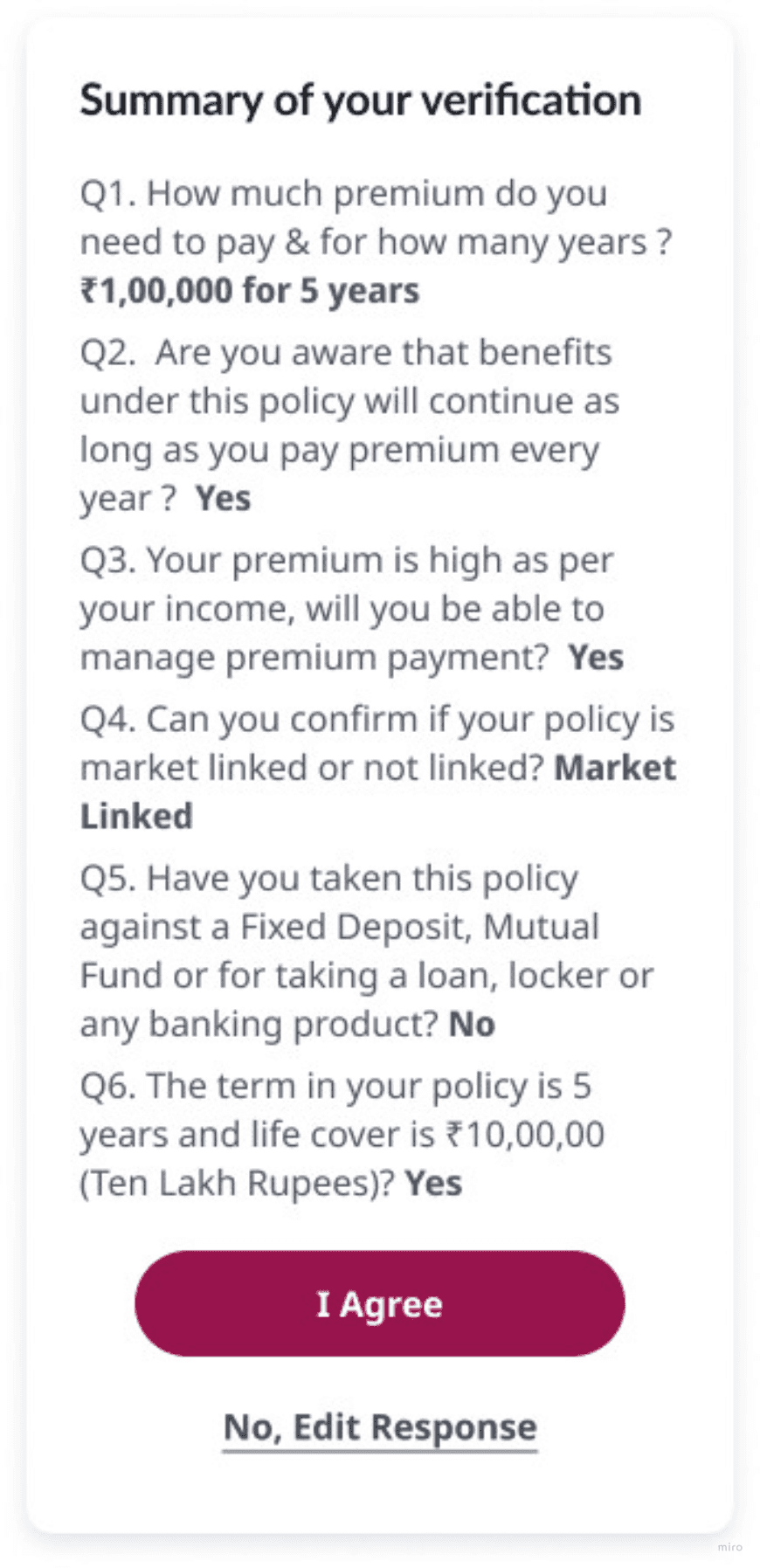
Pre-submission pop-up review with all answers
Decision 4 — Add an AI layer for what humans can't reliably catch
The problem: The verification process depended on human agent judgement for identity verification, third-party detection, and call quality. With 43 agents handling thousands of calls, consistency was impossible. Corrupt recordings meant some calls had no evidence at all. Third-party assistance — a direct market conduct risk — was effectively undetectable.
What I designed:
Face match and liveness detection — real-time facial recognition verifies identity during the call. Results passed to downstream systems.
Third-party assistance detection — real-time voice overlap tracking. If external assistance detected, flagged automatically.
Sentiment analysis — customer's emotional tone monitored to identify frustration before it becomes a drop-off.
Auto-transcription — responses transcribed automatically, creating a text record independent of video quality.
The trade-off: AI verification is faster and more consistent than human review, but it introduces false positive risk. A customer with background noise could be incorrectly flagged for third-party assistance. We kept human agents as the primary decision-makers and positioned AI as a flagging and evidence layer — not a replacement for human judgement.

Customer screen

Visual showing the AI features running alongside the live call: Face match
Decision 5 — Make drop-off visible so it can be fixed
The problem: No Google Analytics. No journey tracking. No way to see which screen, which region, which device, or which language was causing the most drop-offs. Every design decision was being made without evidence of where customers were actually failing.
What I designed: GA implementation across every page and event in the customer journey. Journey breakdown by region, device, and language. Disposition and sub-disposition dropdown for agents. A new "Market Conduct Issue" disposition category added alongside "Call Dropped" and "Case Closed."
Why this matters: The 41% call drop rate was a total. GA turned it into a segmented picture — which stages, which regions, which devices, which languages. Future design decisions could now be evidence-based rather than observation-based.
Usability testing — what changed because of real users
Three findings from testing directly shaped the final designs.
Finding 1 — Documents collected mid-call created dead time
Agents were asking for documents during the live call. Customers — especially elderly ones — would search through their phone or bag while the agent waited. Testing confirmed this was the single biggest contributor to extended handling time.
Decision: Document collection moved to before the call starts. By the time the agent joins, everything needed is already uploaded.
Finding 2 — Elderly users failed camera flip every time
In testing sessions with elderly users specifically, camera flipping was attempted and failed consistently. Not occasionally — every time. The combination of finding the button, tapping it correctly, and confirming the right camera was active while simultaneously speaking and answering questions was beyond what most elderly users could manage without help.
Decision: Agent camera control. Tested post-change: zero camera flip failures when agent controlled the switch.
Finding 3 — Lifestyle questions during the wait added frustration, not efficiency
Lifestyle and proposal questions were being asked during the queue waiting period. The logic was to use wait time productively. Testing showed the opposite — customers in the queue were already anxious, and answering complex questions before the call felt premature and confusing. It added to the sense that the process was unclear.
Decision: Questions moved to a structured pre-call form, completed before the customer enters the queue. The wait screen focuses on trust content and queue information only.
These numbers reflect the measurable impact behind
the work I’ve delivered.
35%
Reduction in average wait time
95%
Agent Adoption
47%
Improving throughput yield
41%
Improving call drop rate]
10k+
Users around the country